Zandroid Godot
A downloadable tool
Zandroid Pro — Mobile Preview Suite for Godot 4
Stop waiting on emulators. Stop borrowing a Mac to test iOS. Start designing your mobile UI inside the editor where you already are.
Zandroid Pro turns Godot 4's Play button into a mobile-shaped preview window. Pick from 57 iPhone, iPad, and Android device presets and your game launches at the right aspect ratio, with safe-area overlays, notch / Dynamic Island visualization, and touch emulation already wired up.
No Android SDK. No Xcode. No Mac.
Why I built this
I shipped a free Android Emulator Launcher plugin first. It works — but it builds a real APK and ships it to a real Android emulator on every iteration. Boot the emulator, wait for the install, swipe the splash. Five minutes per change.
The truth is, most of the time you don't need to deploy. You just need to know whether your UI fits the safe area, whether your buttons are reachable with thumbs, whether the Dynamic Island eats your title bar. That's a design question, not a deployment question.
Zandroid Pro answers the design questions in milliseconds.
What you get
57 device presets
| Family | Devices |
|---|---|
| iPhone | SE 3 → 16 Pro Max — including iPhone 16e (notch) and full iPhone 15/16 Pro line (Dynamic Island) |
| iPad | mini 7, iPad 11, Air M2 (11" + 13"), Pro M4 (11" + 13") |
| Pixel | 6a → 9 Pro XL, 9a |
| Galaxy S | S22 → S25 Ultra |
| Foldables | Z Flip 5/6, Z Fold 5/6 (folded + unfolded) |
| Other | OnePlus 12, OnePlus 13, OnePlus Nord 4/5/CE 4, Xiaomi 14 / 14 Pro |
| Tablets | Pixel Tablet, Galaxy Tab S9 / S9+ / S9 Ultra |
Each preset stores logical dp dimensions, device pixel ratio, four-side safe-area insets, notch type, and corner radius — sourced from manufacturer documentation.
Live overlay during preview
- Red shading on safe-area zones the OS reserves (status bar, home indicator, notch)
- Black notch / Dynamic Island / punch-hole drawn in the right place for the right device
- Touch indicators when you click — see exactly where input lands
- Bottom-left badge with device name and current viewport dimensions
Zero project pollution
Settings are written to a temporary override.cfg only while the preview is running, then deleted. Your project.godot is never modified. Your stretch settings are preserved. Your design viewport is preserved.
One-click controls
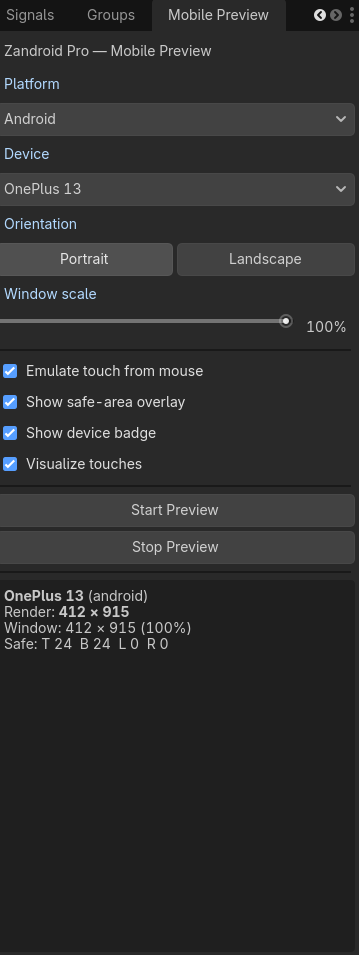
- Pick platform → device → orientation
- Drag a slider to scale the window to fit your monitor
- Click Start Preview
- The editor's normal Play button now runs at iPhone dimensions
How it works
Zandroid Pro doesn't reinvent Godot's runtime. It uses Godot's built-in override.cfg mechanism to inject:
display/window/size/window_width_overrideandwindow_height_override— shapes the OS window like the chosen devicedisplay/window/handheld/orientation— portrait or landscapeinput_devices/pointing/emulate_touch_from_mouse— turns clicks into touch events- An
[autoload]entry pointing at the runtime overlay
When you click Stop Preview, override.cfg is deleted and your project is exactly as it was.
That's it. No engine fork. No native compile. No extension layer. Pure GDScript, two files of plugin code, and the same Play button you've been clicking for years.
Requirements
- Godot 4.x (developed and tested against 4.6)
- A main scene set in your project
- That's all
You do not need: Android Studio, the Android SDK, Java, Gradle, Xcode, a Mac, an iPhone, an Android device, an emulator, or a developer account.
License
Single-developer commercial license.
You may:
- Install the plugin on machines under your control
- Use it on as many of your own projects as you want
- Ship games built with the plugin's help to any platform / store
- Modify the source for use in your own projects
You may not:
- Redistribute or resell the plugin source
- Include the plugin in starter kits, asset bundles, or template projects offered for sale or free download
- Remove the copyright notices
Studios with multiple developers should purchase one license per seat.
Full terms ship in the LICENSE file inside the download.
Installation
- After purchase, download the ZIP from your Itch library
- Copy the
addons/zandroid_pro/folder into your Godot project'saddons/folder - Project → Project Settings → Plugins → enable Zandroid Pro: Mobile Preview Suite
- The Mobile Preview dock appears on the right side of the editor
Roadmap
Already shipped in v1.0:
- 57 device presets, two families, foldables, tablets
- Safe-area overlay
- Notch + Dynamic Island + punch-hole rendering
- Touch indicators
- Aspect-correct window sizing
- Stretch-mode preserved (your game renders the way it does on real devices)
Planned for upcoming releases (purchase v1.0 → free updates for the life of the major version):
- v1.1 — Multi-instance preview (run two devices side by side)
- v1.2 — Native-resolution screenshot export for App Store / Play Store listings
- v1.3 — Custom device presets via a JSON file in your project
- v1.4 — Optional bezel rendering (phone frame around the window)
Support
- Documentation — included in the download as
README.md - Bug reports — via the support link in your purchase email
- Pre-purchase questions — leave a comment on this Itch page or DM me
If something's broken, I want to fix it. Plugins should make your life easier, not give you more bugs to chase.
FAQ
Does this replace deploying to a real device? No. Real-device testing is irreplaceable for performance, input latency, and platform-specific behaviors. Zandroid Pro replaces the design iteration loop — the dozens of "does this fit?" questions you ask before you ever build an APK.
Will iOS rendering match a real iPhone exactly? The aspect ratio, safe areas, and touch input will match. Pixel-perfect rendering of iOS-specific shaders or platform fonts isn't simulated — for that, deploy to TestFlight on a borrowed device. But for layout, UI, and touch ergonomics, the preview is accurate.
Does it work without an internet connection? Yes. After download, no online connection is needed.
Is it Linux-compatible? Yes. The plugin is pure GDScript — anywhere Godot runs, this runs.
Will my project work without the plugin? Yes. Disable the plugin and your project is unaffected — the plugin only activates when you click Start Preview.
What if a device I need isn't in the list?
Adding a device is one struct in devices.gd. The format is documented and trivial to extend. Custom-preset support via JSON is on the roadmap.
Get the free version too
Need to actually deploy and test on a real Android device? Grab the free Android Emulator Launcher — it builds an APK and ships it to your emulator with one click. The two plugins are designed to coexist.
Use Zandroid (free) for deployment. Use Zandroid Pro for iteration.
Purchase
In order to download this tool you must purchase it at or above the minimum price of $1.99 USD. You will get access to the following files:
Development log
- Zandroid Godot Mobile Preview76 days ago
Leave a comment
Log in with itch.io to leave a comment.